


General Information for Participants
1. The Meeting Format
The 88th Annual Meeting of the Japanese Society of Hematology will be held in mainly on site.
(some programs to be streamed live and on-demand at a later date)
2. How to participate
In Person
- Upon your registration and complete payment, registration confirmation email will be sent.
- Your name badge can be downloaded from the service counter below from October 1.
- Please print your own name badge in advance and bring it with you to the event. (A4 size, color printing recommended)
- Name badge will not be printed at the venue, please make sure to download yours in advance.
- Neck straps will be distributed at the venue.
Web Participation
- The meeting will be available for live streaming or on-demand viewing. You can participate virtually under a stable internet connection.
*Google Chrome is recommended as a browser. - Please log in 'live streaming' on the top page of the 88th Annual Meeting of the Japanese Society of Hematology.
- For virtual participation, Registration ID(Email address) and Password are required to log in.
3. Registering for online participation
Registration period for online participation
Pre-registration: August 5 (Wed) ‒ September 30(Wed), 2026 (Japan time UTC+9)
Registration: October 1 (Thu)‒ November 30(Mon), 2026 (Japan time UTC+9)
| Category | Early Registration | Registration | Remarks |
|---|---|---|---|
| JSH International Members | JPY 12,000 | JPY 15,000 | Tax exempt |
| Non-Members | JPY 20,000 | JPY 30,000 | Tax included |
| Junior Residents Graduate Students(except M.D.) Undergraduate Students International Students | Exempt | Exempt | Certificate required |
| Reception(Members) | JPY 3,000 | JPY 3,000 | Tax included |
| Reception(Non-Members) | JPY 3,000 | JPY 5,000 |
*Reception will be held at 19:15 on October 10(Sat)at Kyoto International Conference Center.
4. Certificate of participation / Receipt
In person / Web participation
- Certificate of participation
Certificates can only be downloaded online from October 14(Wed) to November 30(Mon), 2026.(Japan time, UTC+9). Only digital certificate of participation is issued. - Receipt for Participation Fee
Receipt can be downloaded from the service counter by November 30(Mon), 2026.(Japan time, UTC+9). Only digital receipt is issued.
5. Corporate seminars
During the meeting, corporate seminars such as morning/luncheon/evening seminars, industry or online seminars will be held with corporate partners.
6. Pharmaceutical and medical device exhibitions, exhibition rooms
During the meeting, corporate partners can hold exhibitions to introduce their products in designated area of the venue.
For Chairperson
Chairpersons for oral presentations should come to the next chairperson seat in the presentation venue 15 minutes prior to the beginning of the session to be chaired.
Instruction for Oral Presentations
Guidelines for Oral Speakers
- All presentation must be made in the form of PC presentation in English or Japanese.
- Speakers are asked to operate the slides during the presentation by themselves.
- When the presenter ahead of you takes the stage, please be seated in the Next Speaker seat.
- Speakers' Preview Room:
Speakers should bring their presentation data to Speakers' Preview Room at least 30 minutes before their sessions start, in order to complete a run-through of the connection and operation. - The data can be registered and checked at any time during the opening hours.
- Location:
Please ensure that you can accept the presentation data in a specific room.
Preview Room 1: Kyoto International Conference Center Room104
Preview Room 2: The Prince Kyoto Takaragaike B2F
Opening Hours
| Location | October 9(Fri) | October 10(Sat) | October 11(Sun) |
|---|---|---|---|
| Preview Room 1 (Room 1-15) | 8:00-17:30 | 7:00-18:00 | 7:30-15:30 |
| Preview Room 2 (Room 16-18) |
Notes on preparing your presentation data
1. Guideline for Data Registration
- The room is equipped with a laptop running Windows 10 and either PowerPoint 2021.
- Prepare your presentation on USB memory. Do not use CD-R and CD-RW. The file of your presentation data should be entitled "Presentation No.-your name.ppt".
- To avoid display problems, use only the standard fonts provided with Microsoft PowerPoint for Windows such as Times New Roman, Arial, Century, Century Gothic, Symbol.
- The resolution of the screen is full HD (1920×1080).
- Virus scanning in advance is desirable.
- If you would like to make presentation with the data created with Windows Vista or Macintosh, or contain video files, please bring your own laptop and computer charger. Be sure that your file is compatible with Windows operation system.
2. Guideline for Using Your Own Computer
- We can provide only HDMI for connect. Kindly bring your conversion cable if necessary.
- Your PC should be checked for performance of your presentation data at the PC room beforehand, especially in case the data has been created with a PC which is different from the one you have.
- All energy-conserving functions such as screensavers, sleep/power-saving modes 42 should be disabled on PCs to be used in the presentation. Your password also should be inactivated.
- Be sure to bring your AC adapter. If you use the inner battery, it might run out of the power during the presentation.
- Please make sure you save a backup copy of your data on USB memory for protection in case of problems.
- Bring your PC to the PC room no later than 30 minutes prior to your presentation. Your computer will be returned to you at the operation desk after the presentation.
3. Use of movie and sound system
- If the presentation data contains video files, for safety please bring your own laptop.
- The video should be inserted into the PowerPoint data. The file must be saved with the extension ".pptx" or the video will not be inserted. If you link to the video, please also bring the video by itself. It may not work depending on the encoded codec.
- If you need to use sound system, please notify to the staff of PC room when you register your data.
Instructions for Poster Presentations
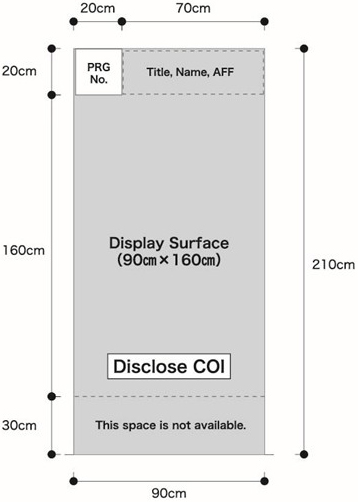
- The size of the poster is as described the following right.
The program number will be provided by Congress Secretariat.
Please prepare the title, name and affiliation by yourself.
Please briefly write the purpose, method, result and overview of your presentation.
Text should be larger than 1 cm.
(It should be legible from 2 meters away for the audience.) - Declaration of Conflict of Interest (COI)
Please disclose COI applicable in the past year at the bottom of the poster. - Please stand by your poster during the discussion time.
- Posters must be removed during the poster removal hours.
Any poster remaining after the designated removal period will be discarded by the Administration Secretariat.
Schedule for Poster Presentations
| Date | Poster Mounting | Discussion | Poster Removal |
|---|---|---|---|
| October 9 (Fri) | 9:00-11:00 | 17:35-18:25 | 18:25-18:45 |
| October 10 (Sat) | 9:00-11:00 | 18:00-18:50 | 18:50-19:10 |
| October 11 (Sun) | 9:00-11:00 | 13:30-14:20 | 14:20-14:40 |
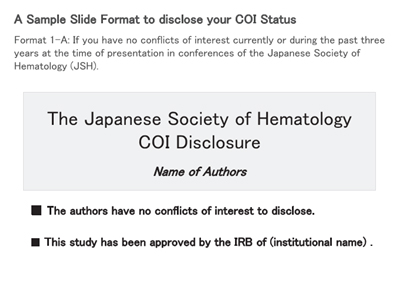
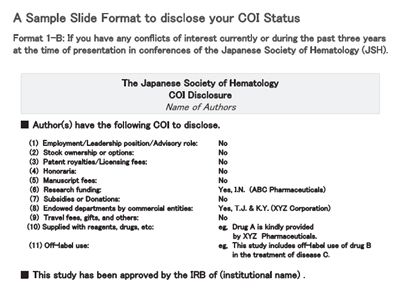
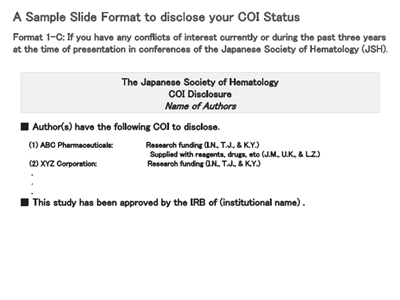
Disclosure of conflict of interest(COI)
Refer to the format on the Japanese Society of Hematology website.
For oral presentations, make the COI disclosure on the beginning slide(or right after the subject/presenter introductory slide); for poster presentations, make it at the bottom of the poster.
[Example of slide and poster disclosures]
1) If you have no conflicts of interest (COI) to declare
 |
2) If you have conflicts of interest (COI)to declare
 |  |